Recasting a Remake: New Faces, Voices and Places

Why a recast face stays the same in every shot applies to remakes exactly as to dramas.
What the read gives you
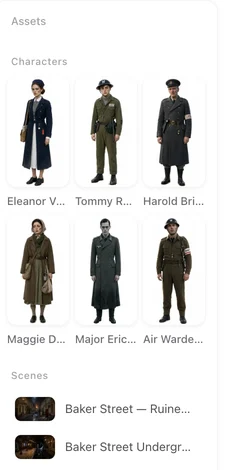
Here is what we found: the shots, the characters, the scenes, the props, the lines. Each character has a name (yours if you gave them in the one line, invented otherwise), a description of what the read saw, and a voice description. Each scene has a description of the place. Nothing has an image yet, and that is the point: the images are made from whatever the entries say when you generate them.
Recast a character
In step 2, open the character. Rewrite Appearance and Clothing to the person you want — age, face, hair, build, what they wear — and Save, then generate the image. Or Upload & Replace with a photo and optimise it into a sheet. The name can change too; the storyboard follows a rename. Writing a description · Using a photo.
To reuse a character you already have in another project, members can pick them from the asset library when adding to the episode. Reusing a cast.
Give them voices
Each character has a voice description from the read. Match a voice from it, pick one from the library with a preview, or upload your own. The lines the read heard are then spoken in that voice. Character voices.
Change the places
A scene read from the clip is a description of what the read saw. Rewrite it, or upload a photo of your own location, and generate. The storyboard’s segments keep pointing at the same scene entry, so the whole scene moves with it. To move the entire story to another market at once, use Target Region in step 1 before you press Next. Region in a remake.
Change the words
The storyboard is editable like any other: open the episode in step 3, edit a shot’s line, save, and shoot. The read’s shot structure — who is in each shot, what they do — is what you keep; the dialogue is yours to change. Editing the storyboard.
What stays from the clip
The structure: the cuts, the framing, who is on screen when, what happens, what is said (as text). Nothing visual from the source is reused: not the faces, not the footage. That is what makes a remake a new picture and keeps you clear of the source’s images; it is not a licence to its story. Rights.
| You want to change | Where | The storyboard |
|---|---|---|
| Who a character looks like | Step 2, Appearance and Clothing, then generate | Unchanged; follows the entry |
| A character’s voice | Step 2, the voice on the card | Unchanged |
| A character’s name | Step 2, the name field | Updated to the new name |
| A location | Step 2, the scene’s description or photo | Unchanged; points at the same scene |
| The whole world | Step 1, Target Region, before Next | Names kept; descriptions relocated |
| A line of dialogue | Step 3, the editor | That shot |
FAQ
Can I put my own actors in a remake?
Yes. In step 2, rewrite each character's description or upload a photo, then generate the images.
Will the new cast follow the same shots?
Yes. The storyboard read from the clip names the entries, not the faces; whatever the entries look like walks through it.
Can I move the story to another country?
Yes. Target Region in step 1 relocates ethnicity, sets and props; names stay as read.
Can I change what they say?
Yes, in the editor, shot by shot, like any storyboard.
Does anything from the original video appear in the result?
No. Only the structure is read; faces and footage are never reused.
Read it, recast it, shoot it
Upload a clip, give the lead a new face and voice, and generate the first segment.
Updated September 26, 2026
Pricing·Novel to Video·Guides·Samples·Support·Privacy·Terms·Legal·Contact·© 2026 SceneMixer