Working in Your Own Language

Switch the site language from the top bar and open any project: the storyboard, the character names and the episode titles follow. This sample episode is the same document you would be reading. The video you already generated does not follow — it says what it was shot saying.
Why there is a working copy and a reading copy
The storyboard is a technical document. Shot markers, duration fields, asset references and voice tags are a format the rest of the system reads literally — the rules that fix continuity, the code that builds the video prompt, the check that shot seconds add up. If the document were simply translated, those would stop matching and stop working.
So there are two copies. The working copy keeps its format; the reading copy is what you see. When translating, the format markers are lifted out, carried across untouched and put back, and the result is checked before it is stored.
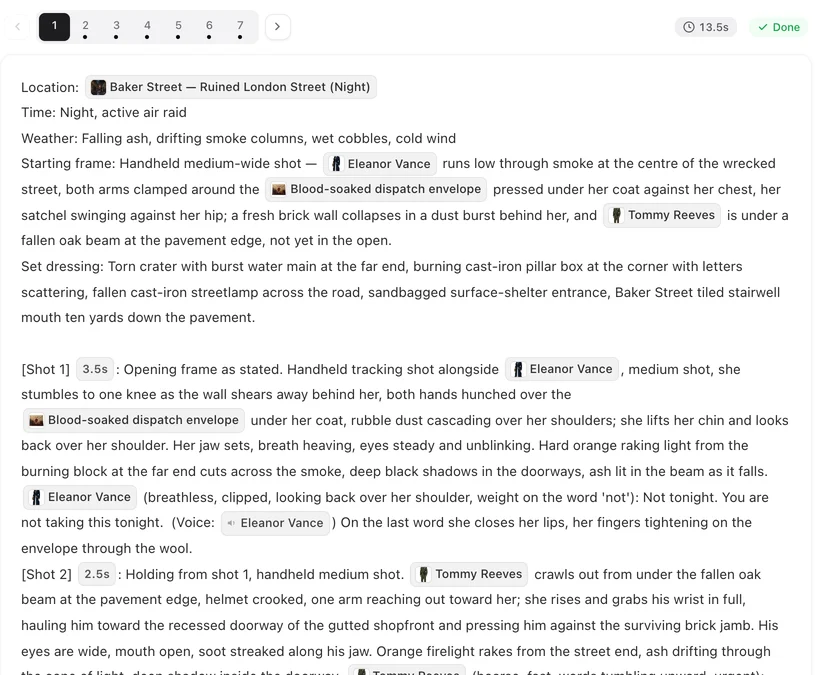
Editing in your language
Edit the storyboard while reading it in German and your edit is saved in German, then translated back into the working copy. Only the blocks you actually changed are sent; everything you left alone is kept exactly as it was rather than round-tripped.
While that is happening, generating video for that segment is held for a moment so the shot is built from the updated text rather than the old one.
When translation has not caught up
Opening an episode whose translation is still running shows a short wait with a way past it — you can always choose to read the original instead, and it lets you through by itself after a few seconds. It is a soft gate on purpose: a translation problem should never be able to lock you out of your own project.
If a translation fails outright, you see the working copy with a retry rather than a blank space.
The one that changes the video
Dialogue language is chosen before the script is read, and it is applied at that step — the lines are written in your chosen language from the start, and the storyboard copies them through word for word.
Because it is applied at the read, changing it later means re-reading the script. The production document itself stays in its working language; only what the characters say changes.
Not every voice model is equally fluent in every language. Where a default tier is known to occasionally mispronounce a word in your chosen language, that is written on the option itself rather than left for you to discover in a finished shot.
What follows your language and what does not
Following: the interface, the storyboard you read, character and location names, episode titles, verification emails, and error messages.
Not following: video you have already generated, and the working copy underneath. Both are records of a decision already made.
| Language | Set where | Changes the video? |
|---|---|---|
| Interface | Top bar, 16 languages | No |
| Storyboard you read | Follows the interface | No |
| Dialogue | Step 1, before the read | Yes |
FAQ
Do I have to pick a reading language?
No. It follows the interface language you already chose, and there is no separate control for it.
Does translating the storyboard cost credits?
No. Reading your project in your own language is free.
If I edit in my language, does the system understand it?
Yes. Your edit is saved as you wrote it and translated back into the working copy, with only the blocks you touched being sent.
Can I change the dialogue language after generating?
It is applied when the script is read, so changing it means re-reading. Video already shot keeps the lines it was shot with.
What if a translation fails?
You see the original working copy with a retry. Nothing is hidden and nothing blocks you.
Switch languages and look
Pick your language in the top bar, then open a sample and read the storyboard in it.
Updated September 21, 2026
Pricing·Novel to Video·Guides·Samples·Support·Privacy·Terms·Legal·Contact·© 2026 SceneMixer