Why the Storyboard’s Labels Become Pills When You Edit, and What You Can Do With Them

Open a segment in edit mode: the shot markers and header labels are pills; click between two pills and type; the pills stay put.
What the pills are
Shot markers ([Shot 3]), header fields (Location:, Time:, Set dressing:, Props:, Opening:), the in-frame line, the voice tag after a spoken line, off-screen markers, and the cut that starts a shot (Cut to close-up). Each is one pill. What the fields mean: The Segment Header Fields.
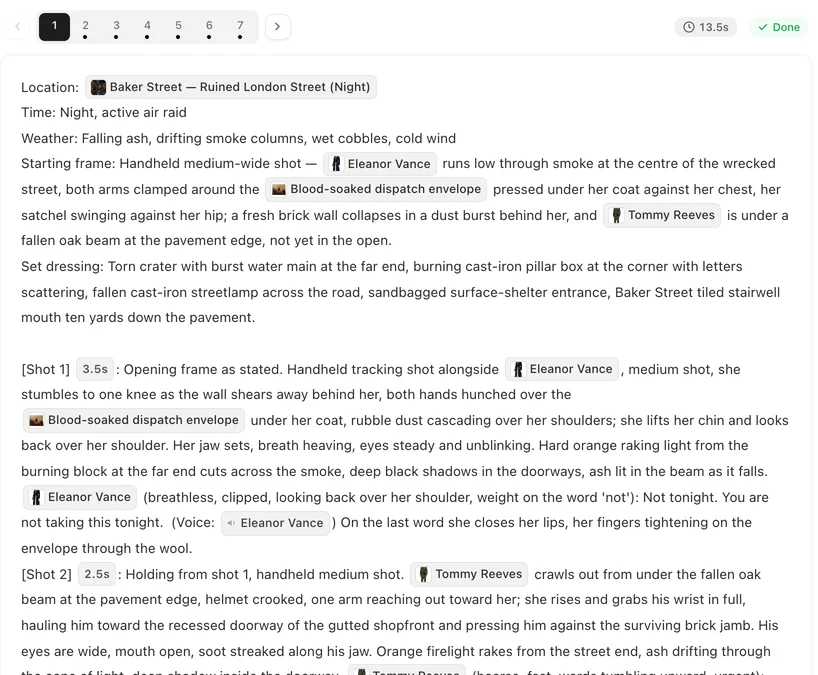
Why they are not plain text
The labels are read by the steps after you: the checks that count seconds, the clip generation that attaches sheets by name, the translation that keeps lines intact. If a label were typed slightly differently, those steps would not recognise it and the segment would quietly lose that structure. A pill cannot be misspelt. On a Chinese interface the labels are already in their stored form and are edited as text.
What you can do with a pill
Delete it (select and backspace), move it (cut and paste, or drag), put text before or after it. The @ menu inserts character, scene, prop and voice references, not header labels. What you cannot do is type inside it or partially delete it. Two pills next to each other, or a pill at the very start of a line, leave a spot you can click into. Editing the Storyboard.
Pasting text from elsewhere
If you paste a segment written elsewhere with English labels — from a document, from the phone app — the common spellings ([Shot 2], Location:, In frame only) are recognised when you save, in the blocks you changed. Unusual spellings are kept as plain text and lose their meaning; check the result. Copying from the editor and pasting back into it restores everything exactly.
Voice tags and off-screen markers
The voice tag after a line ((voice: Mei)) binds the line to that character’s voice; it is a pill and should stay at the end of the line. Off-screen markers (voice-over, off-screen, narrator) in the delivery note are shown in your language and stored in fixed form as well. Dialogue Lines.
| Element | In reading mode | In edit mode |
|---|---|---|
| Shot marker | [Shot 3] | Pill; delete, move, insert |
| Header field | Props: … | Pill label, free text after it |
| Voice tag | (voice: Mei) | Pill at the end of the line |
| Off-screen marker | (voice-over) | Pill inside the delivery note |
| Everything else | Your words | Type freely |
FAQ
Can I remove a pill by mistake?
Yes; the segment then lacks that structure. Undo, or type the label in English at the start of its line (Location:, [Shot 3]); common spellings are restored on save.
Why does the Chinese interface show plain text?
The stored form is Chinese; no display change is needed there.
I pasted from my phone and a label became plain text.
An unusual spelling; retype it in a common form (Location:, [Shot 3]) at the start of the line, or undo the paste.
Do pills affect the clip?
They are how the clip generation knows the structure; keep them.
Can I rename a label?
No. Labels are fixed; what follows them is yours.
Updated October 2, 2026
Pricing·Novel to Video·Guides·Samples·Support·Privacy·Terms·Legal·Contact·© 2026 SceneMixer